API Authentication - App Token
Learn how to authenticate your requests to all Fashion.AI APIs using secure app tokens.
Overview
All FashionAI APIs (Search, Recommendations) use the same authentication method with app tokens. This unified approach simplifies integration and allows you to use a single token across both services.
Authentication Method
All APIs use X-FashionAI-APP-Token via custom headers.
Required Headers
| Header | Required | Description |
|---|---|---|
Content-Type | Yes | Must be application/json |
X-FashionAI-APP-Token | Yes | Your application token |
Obtaining Your Token
Step 1: Access Dashboard
- Log into your FashionAI Dashboard
- Navigate to API Settings in the sidebar
- Click on API Tokens section
Step 2: Generate Token
- Click "Generate New Token"
- Enter a descriptive name (e.g., "Production API Token")
- Click "Create Token"
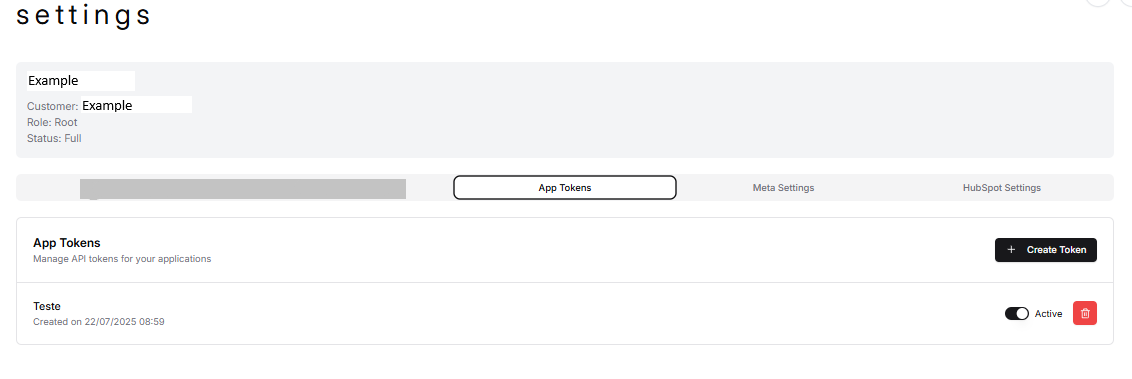
Step 3: Copy Token
# Your token will look like this:
X-FashionAI-APP-Token: ab1234567890abcdef...
⚠️ Important: Copy and store your token immediately. It won't be shown again for security reasons.
Common Issues
- Wrong Header Name
// ❌ Wrong
headers: { 'Authorization': 'Bearer ' + token }

// ✅ Correct
headers: { 'X-FashionAI-APP-Token': token }
Next Steps
Now that you understand authentication, explore specific APIs:
- Search API - Product search functionality
- API Endpoints - Complete endpoint reference
- UI Integration - Frontend integration guides